Guides · Money
Use AI to sort out your bills and paperwork
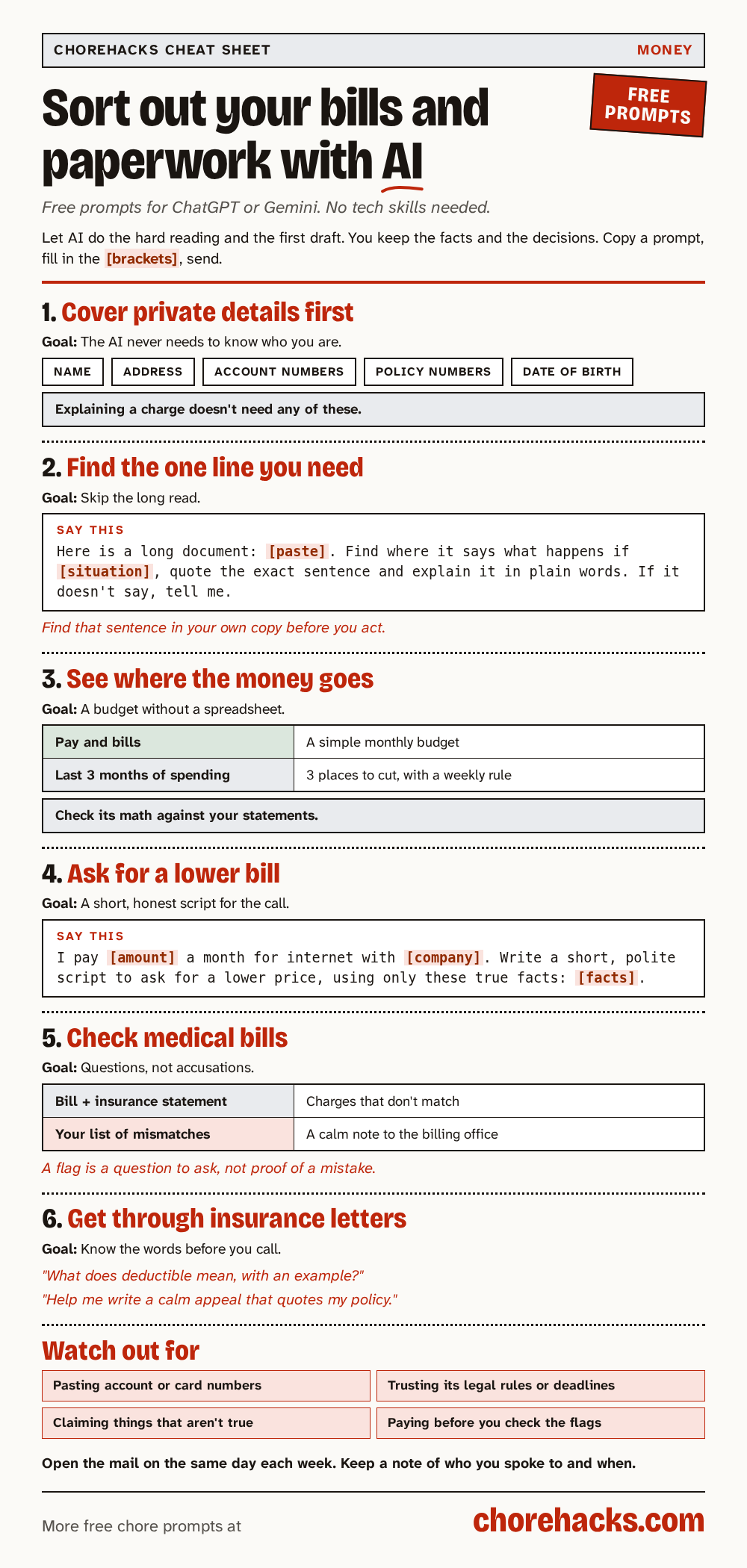
A free AI app like ChatGPT or Gemini can put confusing bills and letters into plain words, help you build a simple budget and draft calm messages to billing offices. You stay in charge of the facts and keep your private details out.
By ChoreHacks · 5 min read · Published · Updated
Most of us have a pile somewhere. Bills, letters from the insurance company, a contract you signed and never read. It's easy to put off because the wording is hard and mistakes can cost money.
A free AI app like ChatGPT or Gemini can help with the reading and the writing. It can put a confusing letter into plain words, find the one sentence you need in a long document and draft a calm message to a billing office. You stay in charge of the facts and the decisions.
This guide goes through it step by step, with a ready-made prompt for each step. A prompt is the message you type into the AI app.
Before you paste anything
Bills and letters are full of private details. The AI doesn't need your name, address, account numbers, policy numbers or date of birth to explain a charge. Cover them up or delete them before you paste or attach anything.
If you're not sure what to remove, this prompt makes a list for you. You still do the editing.
Remove private details before sharing a document
Catches the account number you forgot was on page two.
Here is a document I want to share: [paste with names covered if you prefer]. List every name, address, ID number, account number, and other personal detail I should remove or black out before sending it. I will do the editing and double check it myself.Swap the highlighted parts for your own details.
It can miss something, so read the document once more yourself before you share it with anyone, including the AI.
1. Find the one line you need
Some paperwork is long on purpose. A phone contract, a lease, a warranty or a car manual can run to dozens of pages, and you usually want one answer. What happens if I pay late? Can I cancel early? Is this repair covered?
Paste the text and ask your question.
Find one detail in a long manual or paperwork
You skip scrolling through pages to find the one line you need.
Here is the text of a long document: [paste]. Find where it says what happens if [situation, like a late payment or a warranty claim], quote the exact sentence, and explain it in plain words. If the document does not say, tell me that instead of guessing.Swap the highlighted parts for your own details.
This prompt asks the AI to quote the exact sentence. That matters. Find that sentence in your own copy before you act on it, because the AI can still misquote. If the document doesn't answer your question, the prompt tells the AI to say so instead of guessing.
2. See where the money goes each month
Once you know what you owe, a simple budget shows whether it all fits. You don't need a spreadsheet. Type in your take-home pay and your regular bills, roughly, and let the AI lay it out.
Build a simple monthly budget
Makes a budget you'll actually follow without a spreadsheet.
Check with a pro. AI can get this wrong. Confirm the details with your doctor, pharmacist, lawyer, bank or the company before you act.
My monthly take-home pay is $[amount]. My fixed bills are: [list]. I usually spend about $[amount] on food and $[amount] on other stuff. Build me a simple monthly budget, show where I'm overspending, and suggest 3 realistic cuts.Swap the highlighted parts for your own details.
If you'd like to look back instead, export or copy a few months of spending from your bank's app, take out the account numbers, and use this one.
Find the spending to cut in last quarter's budget
Shows where the money went and gives you a small rule for each leak.
Check with a pro. AI can get this wrong. Confirm the details with your doctor, pharmacist, lawyer, bank or the company before you act.
Here is my spending for the last three months, with account numbers left out: [paste or attach]. Point out three areas of non-essential spending and suggest simple weekly rules to save about [percent]. Tell me which numbers you are unsure about.Swap the highlighted parts for your own details.
Both prompts work only with the numbers you give them. Check the math against your real statements. AI apps can add things up wrong, especially in long lists.
3. Ask for a lower bill
Internet, phone and TV bills often have room to move, but the call feels awkward. Having a short script in front of you makes it easier.
Prepare what to say when asking for a lower internet bill
You make the call with a plan.
Check with a pro. AI can get this wrong. Confirm the details with your doctor, pharmacist, lawyer, bank or the company before you act.
I pay [amount] a month for internet with [company]. I want to ask for a lower price. Write a short, polite script for a chat or phone call that uses only true facts: [how long you have been a customer, any real outages, offers you saw]. Do not include anything I have not told you.Swap the highlighted parts for your own details.
Only say things that are true. Don't claim outages you didn't have or offers you didn't see. The prompt tells the AI to use only the facts you give it, so give it real ones. Keep your latest bill in front of you during the call.
4. Check a medical bill before you pay it
Medical bills are some of the hardest paperwork to read. If you have insurance, you usually get two papers for the same visit. One is the bill from the doctor or hospital. The other is a statement from your insurer called an Explanation of Benefits, or EOB. They should match. Sometimes they don't.
Remove names and ID numbers from both, then paste them in with this prompt.
Check a medical bill against your insurance statement
Catches billing mistakes before you pay them.
Check with a pro. AI can get this wrong. Confirm the details with your doctor, pharmacist, lawyer, bank or the company before you act.
I'm pasting my itemized medical bill and my insurance Explanation of Benefits (names and ID numbers removed). Compare them line by line. Flag any charge that doesn't match, appears twice, or is for a service not on the EOB, and explain each flag in plain English.If it flags a charge, don't assume it's a mistake. The AI can flag things that are fine and miss things that aren't. Treat each flag as a question to ask. This next prompt turns your list into a calm, one-page letter for the billing office.
Write a polite letter to dispute a medical bill
Gives you a clear, calm dispute letter that gets bills corrected.
Check with a pro. AI can get this wrong. Confirm the details with your doctor, pharmacist, lawyer, bank or the company before you act.
I compared my medical bill with my insurance EOB and found these mismatches: [list each one with the date of service, the amount billed and what the EOB says]. Write a short, polite dispute letter to the billing department from [your name], account number [account number]. Number each mismatch, ask them to explain or correct it, and ask them to put the account on hold while they review it. Ask questions, don't accuse anyone of errors. Keep it to one page.Swap the highlighted parts for your own details.
Asking questions works better than accusing anyone. Double-check every date and amount before you send it. If a line has a code you don't understand, ask the billing office what it covers.
5. Get through insurance letters
Insurance letters use words that most people only half know. Deductible, prior authorization, out-of-pocket maximum. The prompt to learn insurance words in plain language gives you a short meaning and an example for each word. Your own policy is what counts in the end, so ask your insurer how each word applies to you.
If a claim was denied, the prompt to word an insurance appeal using your policy's own language helps you write a calm, factual appeal that quotes your policy. Appeal deadlines and rules come from your insurer and the law, so confirm them with your insurer before you rely on the AI's list.
When it's debt, not paperwork
If you're carrying credit card balances, the prompt to compare ways to pay off credit card debt works through two common payoff methods using your own numbers. The timelines it gives are estimates. It's for understanding your options, and a nonprofit credit counselor can give you real advice for free or at low cost.
What the AI can't do for you
Be clear with yourself about the limits.
- It doesn't know the law where you live, and it can be wrong about rules and deadlines.
- It can't see your account, so it doesn't know what you've already paid.
- It can misread a number or a line, especially from a blurry photo.
- It isn't a lawyer, an accountant or a financial adviser.
Use it to understand the paper in front of you and to draft what you want to say. Make the final call yourself, and check anything that involves money with the company or office that sent it.
Habits that keep the pile small
- Open the mail once a week, on the same day, and deal with anything that has a date on it first.
- Keep a short note of what you asked the AI and what the billing office told you, with dates.
- Save the AI's draft and your final message, in case you need to follow up.
- Never paste full account numbers, passwords or card details. No real bill question needs them.
Quick answers
Is it safe to paste a bill into an AI app?
It's safer once you've removed names, addresses and account and policy numbers. The AI can explain a charge without knowing who you are.
Is it free?
Yes. Every prompt in this guide works on the free version of ChatGPT, Gemini, Claude or Grok. Free plans can have daily limits.
Can the AI tell me if a bill is wrong?
It can point out things that look off. Only the company that sent the bill can confirm a mistake, so treat every flag as a question for them.
What if I find a scam letter or text in the pile?
Don't click links or call numbers in it. Look up the company's phone number yourself, from an old bill or its official website, and ask them directly.