Guides · Travel
Plan a trip with AI, from packing list to day-by-day plan
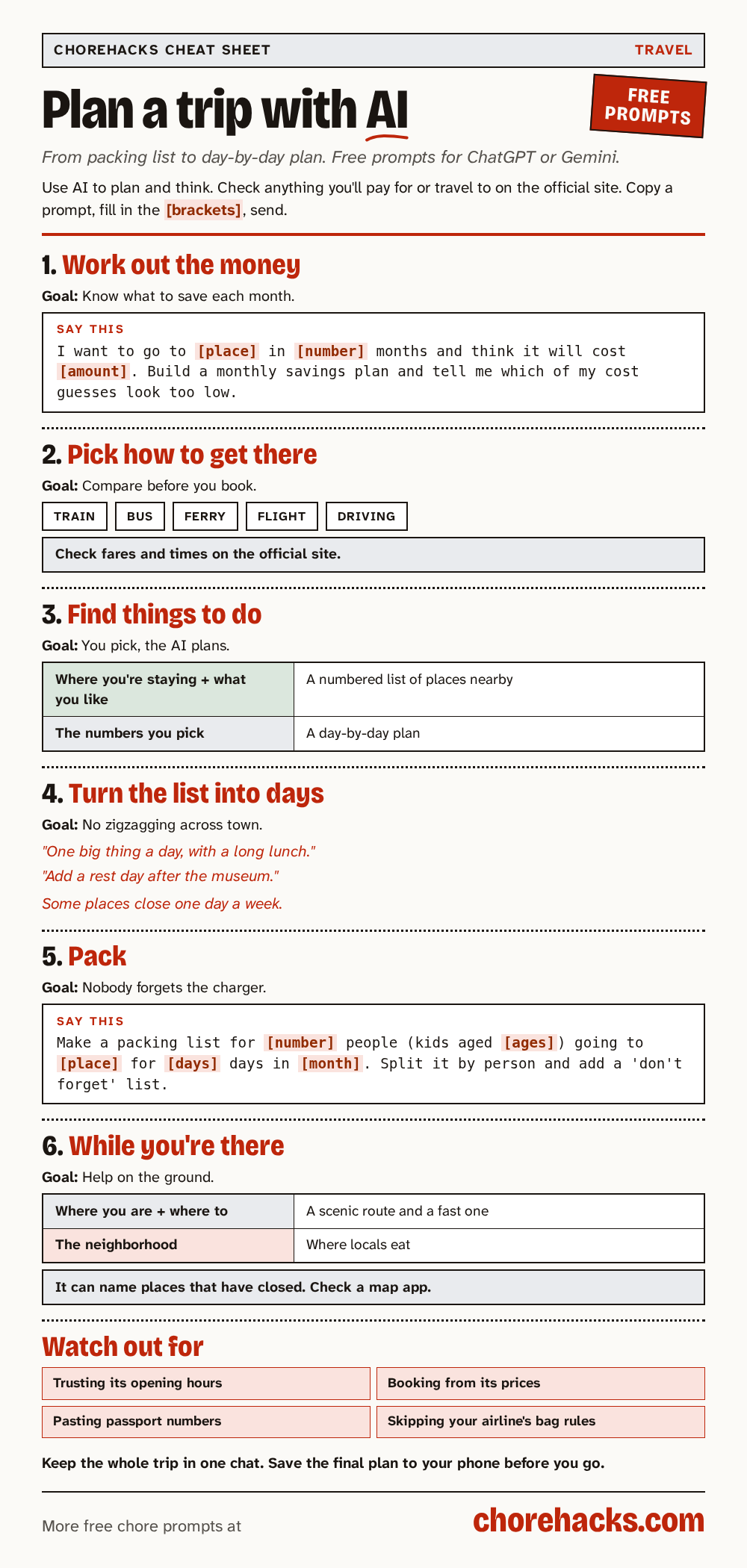
A free AI app like ChatGPT or Gemini can help you save up, get there, plan each day and pack. It often gets times, prices and opening hours wrong, so check anything you'll pay for or travel to on the official website.
By ChoreHacks · 5 min read · Published · Updated
Planning a trip means a lot of tabs. Maps, timetables, reviews, opening hours, a packing list on the back of an envelope. A free AI app like ChatGPT or Gemini can pull a lot of that into one conversation and give you a first draft of the whole thing.
There's one big catch, and it's worth saying up front. AI apps often get times, prices and opening hours wrong, and sometimes they name places that have closed. So use the AI to plan and to think, then check anything you'll pay for or travel to on the official website.
This guide goes in the order you'd plan a trip. Each step has a ready-made prompt to copy. A prompt is the message you type into the AI app.
What you need before you start
- A free AI app. ChatGPT, Gemini, Claude and Grok all work. Never used one? Our start-here page shows you how to get one on your phone.
- Where you're going, roughly when and for how long.
- Who's coming, and anything that matters for them, like small kids, a bad knee or a tight budget.
1. Work out the money
If the trip is a few months away, start here. Tell it where you're going, when and what you think it'll cost. It splits that into a monthly amount to save and shows where the money goes.
Make a savings plan for a trip
You know how much to set aside each month.
Check with a pro. AI can get this wrong. Confirm the details with your doctor, pharmacist, lawyer, bank or the company before you act.
I want to take a trip to [place] in [number] months and I think it will cost about [amount]. Build a monthly savings plan and a simple breakdown of where the money goes. Tell me which of my cost guesses look too low.Swap the highlighted parts for your own details.
The prompt asks the AI to tell you which of your guesses look too low. Trip costs are easy to underestimate, so look up real flight and hotel prices before you settle on a number.
2. Pick how to get there
Train, bus, ferry, flight or driving? This prompt compares them by rough time, cost and hassle, so you only have to look closely at one or two.
Compare ways to get between two places
Sorts your travel options fast, so you only double-check the best one.
I need to get from [place A] to [place B] on [date]. Compare the options (train, bus, ferry, flight, driving) by rough time, cost, and hassle, and tell me what to check on official sites before booking.Swap the highlighted parts for your own details.
Timetables and fares change all the time. Book only after you've checked the official site for the train line, bus company or airline.
If your flight has a long stop in another city, the prompt to decide if a long layover is worth leaving the airport lists what could go wrong with passport control, bags and getting back in time. Check the airport and airline sites, and leave plenty of time.
3. Find things to do near where you're staying
Once you know where you're staying, give the AI the area and what you like. It makes a numbered list of places nearby. You pick the numbers you like, and it builds a day-by-day plan from those.
Plan sightseeing around where you're staying
Builds the sightseeing plan around where you're staying.
I'm staying at [address/area] in [city] for [days]. I like [interests]. Make a numbered table of attractions within 30 minutes of my stay with opening hours, cost, and why I might like it. Then I'll pick numbers and you'll build a day-by-day plan.Swap the highlighted parts for your own details.
This two-step trick works well because you choose, not the AI. Check each place's hours and prices on its own website before you go.
If you want to skip the busy spots, this prompt suggests lesser-known places instead and says which suggestions it's unsure about.
Skip the tourist traps in a city you are visiting
You spend your time on places worth the trip.
I am visiting [city] for [number] days. Which popular attractions are overrated, and what lesser-known places should I visit instead? Explain why, and tell me which suggestions you are unsure about so I can check them.Swap the highlighted parts for your own details.
4. Turn your list into sensible days
Most people end up with a list of places and no order. This prompt groups them by area so you aren't crossing the city back and forth, at a relaxed pace.
Group a trip's sights into sensible days
Fits more into a trip without feeling rushed.
Here are the places I want to see in [city]: [list]. Group them into [number] days so I'm not crossing the city back and forth, with a relaxed pace. Note anything I should book ahead. I'll verify hours myself.Swap the highlighted parts for your own details.
Tell it what kind of pace you like. "One big thing a day, with a long lunch" gets a very different plan from "pack it in." Watch for places that close one day a week, and book ahead wherever it tells you to.
For a big museum, the prompt to plan a museum visit that hits the highlights gives you the must-see pieces and a route that saves your feet. Exhibits move, so check the museum's own map when you arrive.
5. Pack
Packing lists are a job AI does well. Give it the number of people, ages, where you're going, how long and the month.
Make a family packing list
Builds a packing list so nobody forgets the sunscreen.
Generate a packing list for a family of [number] (kids aged [ages]) going to [destination] for [days] days in [month]. Split it by person and add a 'don't forget' list for chargers, documents, and meds.Swap the highlighted parts for your own details.
It splits the list by person and adds a "don't forget" list for chargers, documents and medicines. It can't know the weather or your airline's bag rules, so check the forecast and your airline's baggage page a few days before you leave.
While you're there
Once you've arrived, the AI can help on the ground. The prompt to use AI as a walking guide in a new city gives you a scenic route and a fast route, with landmarks to look for. Keep a map app open too, because it can't see roadworks or closed streets.
For food, this one finds places where locals eat.
Find local restaurants away from the crowds
You eat where the neighborhood eats.
Recommend local restaurants in [neighborhood or city] that locals eat at, not the tourist spots. Tell me what each is known for and which ones you are least sure are still open, so I can check hours and reviews before I go.Swap the highlighted parts for your own details.
It can name restaurants that have closed, or even ones that never existed. Look each one up on a map app and check recent reviews before you walk over.
What to check yourself, every time
Make a habit of checking these on the official website, not the AI's answer.
- Opening hours and days closed
- Prices and fares
- Timetables
- Visa and passport rules
- Bag rules for your airline
Habits that make it easier
- Keep the whole trip in one chat. The AI remembers what you said earlier, so you can say "add a rest day after the museum" without starting over.
- Save the final plan. Copy it into your notes app or take screenshots, so you have it without signal.
- Leave out private details. The AI doesn't need your passport number, booking codes or card details to plan a trip.
- Ask it what it's unsure about. Adding "Tell me what you're unsure of" to any prompt gets you a list of things to double-check.
Quick answers
Is it free?
Yes. Every prompt in this guide works on the free version of ChatGPT, Gemini, Claude or Grok. Free plans can have daily limits.
Can the AI book things for me?
Not with these prompts. They help you plan and decide. You do the booking yourself, on the official site.
Can I trust the opening hours it gives?
No. Treat them as a starting point and check each place's own website. Hours change with the season and on holidays.
Do I need to sign up for anything on ChoreHacks?
No. Copy a prompt and go. The email signup below is optional.